
SQL.What is composite key ?

What is a Composite Key?

Definition

A composite key is a key made of two or more columns that together uniquely identify a row, while each column alone is not sufficient.

It can be:

  • a composite primary key
  • a composite candidate key
  • a composite UNIQUE constraint

Simple example

order_items
-----------
order_id
product_id
quantity

Neither column alone is unique:

  • One order has many products
  • One product appears in many orders

But together:

PRIMARY KEY (order_id, product_id)

➡️ This pair uniquely identifies a row.

Why composite keys exist (relational logic)

Composite keys naturally appear in:

  • Many-to-many relationships
  • Association / join tables
  • Time-scoped entities

Examples:

  • user_id + role_id
  • student_id + course_id
  • account_id + date

Composite key vs Single-column key

AspectComposite KeySingle-column Key
Columns2+1
Natural to domainOften yesOften surrogate
Foreign keysMore complexSimple
ORM supportPainfulEasy
Index sizeLargerSmaller

Composite PRIMARY KEY vs Composite UNIQUE

PRIMARY KEY (order_id, product_id)

Defines row identity

NOT NULL enforced on both columns

UNIQUE (order_id, product_id)

Just enforces uniqueness

NULL rules apply

ORM & real-world tradeoff ⚠️

In practice (Hibernate/JPA, Spring Data):

❌ Composite primary keys:

  • Complicate entity identity
  • Make references verbose
  • Hurt performance in joins

✔️ Common compromise:

id BIGSERIAL PRIMARY KEY,
UNIQUE (order_id, product_id)

This keeps:

  • Simple surrogate key
  • Business uniqueness enforced

Senior engineers do this deliberately.

Interview pitfalls ❌

  • Saying “composite key is just multiple primary keys” ❌
  • Thinking order of columns doesn’t matter (it does for indexes)
  • Using composite PK everywhere “for purity”
  • Forgetting FK complexity

One-sentence interview answer (perfect)

A composite key is a key composed of multiple columns that together uniquely identify a row when no single column is sufficient.

Bonus follow-up (very common)

“Would you use a composite primary key in production?”

Strong answer:

Only when the composite identity is fundamental and stable; otherwise I prefer a surrogate primary key with a composite UNIQUE constraint.
Posted in Без рубрики | Comments Off on SQL.What is composite key ?

SQL.What is the difference between a primary key, a candidate key, and a unique constraint?

1️⃣ Candidate Key

Definition

A candidate key is any minimal set of columns that can uniquely identify a row in a table.

Properties

  • Uniqueness
  • Minimal (no redundant columns)
  • There can be multiple candidate keys per table

Example

users
-----
id
email
passport_number

Candidate keys:

id

email

passport_number

Each could uniquely identify a user.

2️⃣ Primary Key

Definition

A primary key is one chosen candidate key that becomes the main row identifier.

Properties

  • Exactly one per table
  • NOT NULL
  • UNIQUE
  • Often used by foreign keys
  • Logical identity of the row

Example

PRIMARY KEY (id)

Here:

  • id is selected from candidate keys
  • Others remain potential identifiers

🔑 Primary key = chosen candidate key

3️⃣ UNIQUE Constraint

Definition

A UNIQUE constraint enforces uniqueness of values, but does not define row identity.

Properties

  • Can be multiple per table
  • May allow NULLs (DB-dependent)
  • Not necessarily minimal
  • Not used as the main identity

Example

UNIQUE (email)

Key Differences (this is the core)

| Aspect       | Candidate Key          | Primary Key          | UNIQUE Constraint |
| ------------ | ---------------------- | -------------------- | ----------------- |
| Purpose      | Theoretical uniqueness | Logical row identity | Data integrity    |
| Count        | Many                   | One                  | Many              |
| NULL allowed | No                     | No                   | Usually yes       |
| Minimal      | Yes                    | Yes                  | No guarantee      |
| Used by FKs  | Possible               | Yes                  | Usually no        |

Important nuance (Postgres / SQL detail ⚠️)

UNIQUE vs PRIMARY KEY

  • PRIMARY KEY = UNIQUE + NOT NULL
  • UNIQUE may allow multiple NULLs
    • In PostgreSQL: multiple NULLs allowed
    • In SQL Server: single NULL allowed

Interviewers love this detail.


Real-world modeling example

users (
  id BIGSERIAL PRIMARY KEY,
  email TEXT UNIQUE NOT NULL,
  phone TEXT UNIQUE,
  passport_number TEXT UNIQUE
)

Conceptually:

  • Candidate keys: id, email, passport_number
  • Primary key: id
  • UNIQUE constraints: enforce business rules

One-sentence interview answer (perfect)

A candidate key is any minimal set of columns that uniquely identifies a row, a primary key is the chosen candidate key used as the table’s main identity, and a UNIQUE constraint simply enforces uniqueness without defining row identity.

Common interview mistakes ❌

  • Saying “unique key” instead of candidate key
  • Thinking UNIQUE = PRIMARY KEY
  • Forgetting NULL behavior
  • Thinking there can be multiple primary keys
Posted in Без рубрики | Comments Off on SQL.What is the difference between a primary key, a candidate key, and a unique constraint?

SQL.When we should use relational db and when not ?

When should you use a relational database?

Use a relational DB by default unless you have a strong reason not to.

✅ Use a relational DB when:

1️⃣ You need strong consistency & correctness

  • Financial transactions
  • Orders, payments, balances
  • Inventory, quotas, limits

Why

  • ACID transactions
  • Referential integrity
  • Constraints enforced by the DB

If incorrect data is unacceptable → SQL DB

2️⃣ Your data has clear relationships

  • Users → Orders → OrderItems
  • Accounts → Transactions
  • Products → Categories

Why

  • Foreign keys
  • JOINs
  • Normalization

Relational model fits real-world business domains naturally.

3️⃣ You need complex queries

  • Multi-table joins
  • Aggregations
  • Window functions
  • Subqueries

Why

  • SQL is extremely expressive
  • Optimizer handles execution complexity

4️⃣ You need transactions spanning multiple entities

BEGIN;
UPDATE accounts SET balance = balance - 100 WHERE id = 1;
UPDATE accounts SET balance = balance + 100 WHERE id = 2;
COMMIT;

Why

  • Atomicity guarantees
  • Easy rollback on failure

5️⃣ You want data integrity enforced centrally

  • NOT NULL
  • UNIQUE
  • CHECK
  • FOREIGN KEY

Why

  • Business rules live in the DB, not scattered across services

6️⃣ You want predictable long-term evolution

  • Schema migrations
  • Backward compatibility
  • Auditing

Why

  • Strong tooling (Flyway, Liquibase)
  • Mature ecosystem

When should you not use a relational DB?

❌ Avoid relational DBs when:


1️⃣ You need massive horizontal write scalability

  • Millions of writes/sec
  • Global distribution
  • Event ingestion

Better fit

  • Cassandra
  • DynamoDB
  • Kafka + storage

Why

  • Joins & transactions limit horizontal scaling

2️⃣ Your schema is highly dynamic or unknown

  • User-defined fields
  • Rapidly changing payloads

Better fit

  • Document DBs (MongoDB)

⚠️ But beware: flexibility today → chaos tomorrow.

3️⃣ Your access pattern is key-based only

getById(key)
put(key, value)

Better fit

  • Redis
  • DynamoDB

Using Postgres here is overkill.

4️⃣ You’re doing analytics, not transactions

  • Reports
  • Aggregations over billions of rows
  • BI dashboards

Better fit

  • ClickHouse
  • BigQuery
  • Snowflake

OLTP ≠ OLAP.

5️⃣ You need full-text search

  • Relevance ranking
  • Fuzzy matching
  • Tokenization

Better fit

  • Elasticsearch / OpenSearch

Postgres can do search — but it’s not its core strength.

6️⃣ You accept eventual consistency

  • Social feeds
  • Counters
  • Metrics

Better fit

  • NoSQL systems

Decision table (interview gold)

RequirementBest choice
Strong consistencyRelational DB
Complex joinsRelational DB
High write throughputNoSQL
Flexible schemaDocument DB
AnalyticsColumnar DB
CachingIn-memory DB

One-sentence senior answer (perfect)

Use a relational database when data correctness, relationships, and complex queries matter; avoid it when scale, flexibility, or specialized access patterns are more important than strong consistency.


Final interviewer tip 🎯

If unsure — start with PostgreSQL.
Most startups and even large systems move away from SQL too early and regret it.

Posted in Без рубрики | Comments Off on SQL.When we should use relational db and when not ?

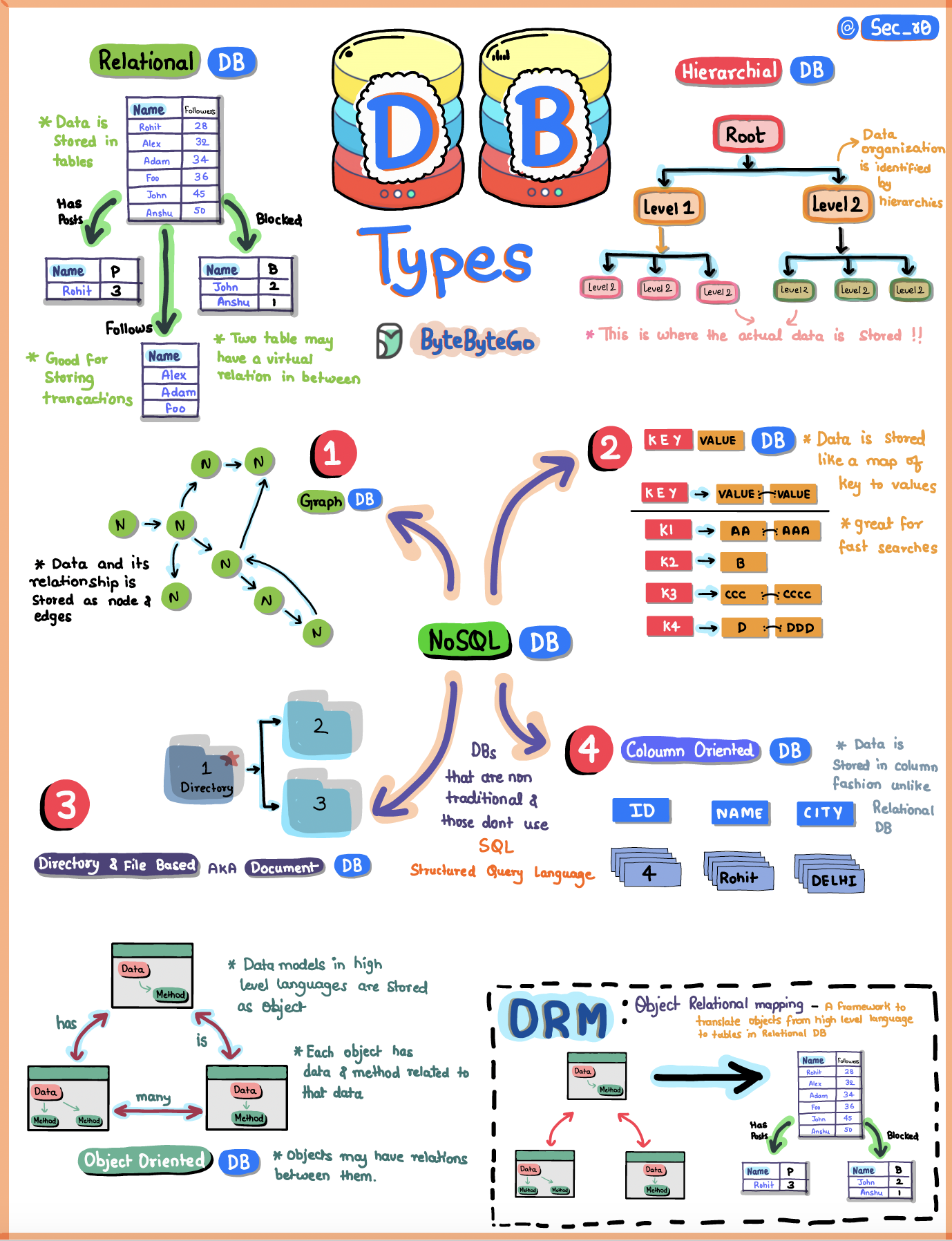
SQL.What types of databases exists ?

1️⃣ Relational Databases (SQL)

Model

  • Tables (rows & columns)
  • Fixed schema
  • Relations via foreign keys
  • ACID transactions

Examples

  • PostgreSQL
  • MySQL
  • Oracle
  • SQL Server

Best for

  • Business data
  • Financial systems
  • Strong consistency
  • Complex queries & joins

Interview keyword

“Strong consistency, relational model, declarative SQL”

2️⃣ NoSQL Databases (Non-Relational)

Designed to solve scalability, flexibility, and performance problems where SQL struggles.

2.1 Key–Value Stores

  • Data: key → value
  • Extremely fast
  • Simple access pattern

Examples

  • Redis
  • DynamoDB

Use cases

  • Caching
  • Sessions
  • Rate limiting

2.2 Document Databases

  • JSON / BSON documents
  • Flexible schema
  • Nested structures

Examples

  • MongoDB
  • CouchDB

Use cases

  • User profiles
  • Content management
  • Rapid schema evolution

2.3 Wide-Column (Column-Family)

  • Rows with dynamic columns
  • Optimized for massive scale

Examples

  • Cassandra
  • HBase

Use cases

  • Time-series
  • Event data
  • Write-heavy systems

2.4 Graph Databases

  • Nodes + edges + properties
  • Relationship-first model

Examples

  • Neo4j
  • Amazon Neptune

Use cases

  • Social networks
  • Recommendation engines
  • Fraud detection

3️⃣ Columnar / Analytical Databases (OLAP)

Model

  • Data stored by column, not row
  • Optimized for aggregation
  • Read-heavy

Examples

  • ClickHouse
  • Snowflake
  • BigQuery

Use cases

  • Analytics
  • Reporting
  • BI dashboards

Interview keyword

“OLTP vs OLAP separation”


4️⃣ Time-Series Databases

Model

  • Timestamped data
  • High write throughput
  • Retention policies

Examples

  • InfluxDB
  • TimescaleDB

Use cases

  • Metrics
  • Monitoring
  • IoT

5️⃣ Search Engines (Search Databases)

Model

  • Inverted indexes
  • Full-text search
  • Scoring & relevance

Examples

  • Elasticsearch
  • OpenSearch

Use cases

  • Search
  • Log aggregation
  • Observability

⚠️ Interview trap
Not a replacement for transactional DBs.

6️⃣ In-Memory Databases

Model

  • Data stored primarily in RAM
  • Extremely low latency

Examples

  • Redis
  • Memcached

Use cases

  • Caching
  • Distributed locks
  • Queues

7️⃣ NewSQL / Distributed SQL

Model

  • SQL + ACID
  • Horizontal scalability
  • Cloud-native

Examples

  • CockroachDB
  • YugabyteDB

Use cases

  • Global systems
  • Strong consistency + scale
ByteByteGo | Types of Databases

Senior-level summary (perfect spoken answer)

Databases can be broadly classified into relational SQL databases and several NoSQL categories like key-value, document, column-family, and graph databases. Additionally, there are specialized systems such as columnar OLAP databases, time-series databases, search engines, and distributed SQL systems. The choice depends on consistency requirements, query patterns, and scalability needs.

Posted in Без рубрики | Comments Off on SQL.What types of databases exists ?

SQL.What is SQL, and what does it mean that SQL is a declarative language?

What is SQL?

SQL (Structured Query Language) is a standard language used to:

  • Query data from relational databases
  • Modify data (INSERT, UPDATE, DELETE)
  • Define database structure (tables, indexes, constraints)
  • Control access (GRANT, REVOKE)

It operates on data stored in tables (relations) and is based on relational algebra.

Examples of SQL-based databases:

  • PostgreSQL
  • MySQL
  • Oracle
  • SQL Server

What does it mean that SQL is declarative?

Short definition (interview-ready)

SQL is declarative because you describe what result you want, not how to get it.

You specify:

  • What data you need
  • What conditions it must satisfy

You do NOT specify:

  • Which indexes to use
  • Whether to use a hash join or nested loop
  • In what order rows are read

That responsibility belongs to the query optimizer inside the database.

Declarative vs Imperative (key contrast)

Imperative (how)

for (User u : users) {
    if (u.age > 30) {
        result.add(u);
    }
}

You explicitly control:

  • Iteration
  • Condition checks
  • Order of execution

Declarative (what)

SELECT *
FROM users
WHERE age > 30;

You say:

  • “Give me users older than 30”

The database decides:

  • Full scan vs index scan
  • Join algorithms
  • Execution order

Why SQL being declarative matters (important!)

Because of this:

  • The same query can run efficiently on:
    • Small tables
    • Huge tables
    • Different hardware
  • The DB can re-optimize queries as data grows
  • You get performance improvements without code changes

This is why hand-written “clever” SQL often loses to the optimizer.

What SQL does not guarantee (trap question)

Declarative SQL does NOT guarantee:

  • Row order (unless ORDER BY)
  • Execution plan stability
  • Deterministic evaluation order in WHERE

Example:

SELECT *
FROM users;

➡️ Result order is undefined.

One-sentence senior-level answer

SQL is a declarative language for working with relational data, where you specify the desired result set, and the database engine decides the most efficient execution strategy using its optimizer.

Common interview mistakes ❌

  • Saying “SQL is procedural”
  • Talking about loops or execution order
  • Thinking WHERE is evaluated before FROM logically
  • Assuming row order without ORDER BY
Posted in Без рубрики | Comments Off on SQL.What is SQL, and what does it mean that SQL is a declarative language?

SQL.What are the different SQL operators?

As a senior backend engineer, you’re expected to classify operators, not just list random ones.

Short interview answer:
SQL operators are used in expressions to compare values, filter rows, perform calculations, and combine conditions. They include arithmetic, comparison, logical, set, and special operators.

1️⃣ Arithmetic operators

Used in numeric expressions.

| Operator | Meaning                      |
| -------- | ---------------------------- |
| `+`      | Addition                     |
| `-`      | Subtraction                  |
| `*`      | Multiplication               |
| `/`      | Division                     |
| `%`      | Modulo (DB-specific support) |
SELECT price * quantity AS total
FROM orders;

2️⃣ Comparison operators

Used mainly in WHERE, JOIN ON, HAVING.

OperatorMeaning
=Equal
<> / !=Not equal
>Greater than
<Less than
>=Greater or equal
<=Less or equal
SELECT *
FROM users
WHERE age >= 18;

3️⃣ Logical operators

Combine conditions.

SELECT *
FROM users
WHERE active = true AND deleted = false;
SELECT *
FROM users
WHERE active = true AND deleted = false;

⚠️ Operator precedence matters (NOT > AND > OR).

4️⃣ NULL-related operators (very important in interviews)

4️⃣ NULL-related operators (very important in interviews)

SELECT *
FROM users
WHERE deleted_at IS NULL;

❌ = NULL never works — classic trap.

5️⃣ Set / range operators

IN / NOT IN

SELECT *
FROM orders
WHERE status IN ('NEW', 'PAID');

⚠️ NOT IN + NULL = unexpected empty result.

BETWEEN

WHERE created_at BETWEEN '2025-01-01' AND '2025-01-31';

Inclusive on both sides.

LIKE / ILIKE (Postgres)

WHERE email LIKE '%@gmail.com';

% – any sequence

_ – single character

6️⃣ Aggregate operators

Used with aggregation functions.

FunctionMeaning
COUNTRow count
SUMSum
AVGAverage
MIN / MAXExtremes
SELECT COUNT(*) 
FROM orders;

Used together with GROUP BY, filtered via HAVING.

7️⃣ Set operators (combine result sets)

OperatorMeaning
UNIONMerge, remove duplicates
UNION ALLMerge, keep duplicates
INTERSECTCommon rows
EXCEPTDifference
SELECT id FROM a
UNION
SELECT id FROM b;

8️⃣ Existence & subquery operators

EXISTS

SELECT *
FROM users u
WHERE EXISTS (
    SELECT 1 FROM orders o WHERE o.user_id = u.id
);

Efficient for correlated subqueries.

ANY / ALL

WHERE price > ALL (SELECT price FROM discounts);

Rare but interview-relevant.

9️⃣ Bitwise operators (DB-specific)

Common in Postgres, SQL Server.

OperatorMeaning
&AND
``
^XOR
<<Shift left
>>Shift right

10️⃣ Special operators worth mentioning (Postgres)

  • || – string concatenation
  • :: – type cast
  • -> / ->> – JSON operators
  • @> – contains (arrays / JSONB)
WHERE data->>'status' = 'ACTIVE';

How to answer in an interview (clean version)

SQL operators can be grouped into arithmetic, comparison, logical, NULL-handling, set, aggregate, and existence operators.
They are mainly used in WHERE, JOIN, HAVING, and SELECT expressions to filter, compare, and combine data.


Typical interview pitfalls ⚠️

  • Using = NULL
  • Forgetting NULL behavior in NOT IN
  • Ignoring operator precedence
  • Confusing WHERE vs HAVING
Posted in Без рубрики | Comments Off on SQL.What are the different SQL operators?

Database.JPA Stream vs List: What Actually Happens Under the Hood

Introduction

In JPA and Hibernate, repository methods can return either List<DTO> or Stream<DTO>.
At first glance, this looks like a minor API choice. In reality, it reflects two fundamentally different data processing models with serious implications for memory usage, GC behavior, latency, and scalability.

This article explains:

  • how Stream<DTO> works at the JDBC and SQL level
  • why it does not execute multiple SQL queries
  • where the real savings come from
  • when streaming is useful — and when it is pointless or dangerous

List<DTO>: Eager Materialization


List<UserDto> users = repository.findAllDtos();

What happens internally

  1. Hibernate executes one SQL query
  2. JDBC reads the entire ResultSet
  3. Hibernate:
    • creates all DTO objects
    • stores them in a List
  4. The full result stays in memory until the list is released

Characteristics

  • Memory usage: O(N)
  • GC pressure: high
  • Simple and safe
  • Suitable for:
    • UI requests
    • pagination
    • small or medium result sets

Key limitation

Even if you later process the list with streams or filters, all rows are already loaded into memory.

Stream<DTO>: Cursor-Based Processing

@Transactional(readOnly = true)
try (Stream<UserDto> stream = repository.streamAllDtos()) {
    stream.forEach(this::process);
}

What happens internally

  1. Hibernate executes one SQL query
  2. JDBC opens a ResultSet backed by a database cursor
  3. Rows are read incrementally, using ResultSet.next()
  4. DTOs are created on demand
  5. Previously processed rows can be garbage-collected

Important clarification

  • SQL is executed once
  • Hibernate does not re-query the table
  • Fetching happens at the JDBC protocol level, not SQL level

Does ResultSet Hold All Rows in Memory?

Not necessarily.
A ResultSet is a cursor, not a collection.

Correct streaming behavior requires:

  • autoCommit = false
  • fetchSize > 0
  • an active transaction
  • a JDBC driver that supports cursor-based fetching

Example (PostgreSQL):

spring.jpa.properties.hibernate.jdbc.fetch_size=100

With this configuration:

  • the driver fetches rows in batches (e.g. 100 at a time)
  • memory usage on the client stays bounded
  • previously read rows are discarded

Without these settings

The JDBC driver may:

  • read the entire result into memory
  • turn your “stream” into a fake stream

Why Is Streaming Useful If We Still Read All Rows?

This is the key conceptual point.

The benefit is not reading fewer rows

The benefit is not holding all rows at the same time.

Real advantages

1. Stable memory usage

  • Heap does not grow with result size
  • No massive object retention
  • Predictable GC behavior

2. Reduced GC pressure

  • Objects become eligible for GC immediately after processing
  • No long-lived lists

3. Early termination

repository.streamAllDtos()
    .filter(...)
    .findFirst();

Only the necessary rows are read from the ResultSet.

4. Back-pressure

Streaming naturally matches the speed of:

  • file writes
  • network calls
  • Kafka producers
  • external APIs

What Streaming Does Not Solve

  • It does not make billion-row scans fast
  • It does not reduce I/O cost
  • It does not remove the need for proper data partitioning

For very large datasets, better approaches include:

  • keyset pagination
  • range-based processing
  • table partitioning
  • database-native export tools
  • distributed processing systems

Critical Pitfall: Streaming Entities

Stream<User> streamAll(); // dangerous

Hibernate stores entities in the persistence context.

Result:

  • memory grows anyway
  • streaming loses its benefit
  • potential memory leak

Correct approach

Stream<UserDto> streamAllDtos(); // safe

When Stream<DTO> Is Worth Using

ScenarioRecommended
UI / REST responses❌ No
Small datasets❌ No
Batch processing✅ Yes
Data export✅ Yes
ETL jobs✅ Yes
Early-stop queries✅ Yes
Limited heap✅ Yes

Conclusion

Stream<DTO> in JPA does not execute multiple SQL queries and does not magically reduce I/O.
Its value lies in controlling memory usage, GC pressure, and processing flow.

Used correctly, it enables stable, scalable batch processing.
Used blindly, it provides no benefit and can even cause production issues.


Interview Question Based on This Topic

Question:
In JPA, what is the difference between returning List<DTO> and Stream<DTO> from a repository method?
Does Stream execute multiple SQL queries, and where does the actual performance and memory benefit come from?

What a strong answer should mention

  • single SQL execution
  • JDBC ResultSet and cursor behavior
  • fetch size and transaction requirements
  • memory and GC impact
  • DTO vs Entity streaming
  • when streaming is appropriate
Posted in Без рубрики | Comments Off on Database.JPA Stream vs List: What Actually Happens Under the Hood

Sql.What is SQL?

SQL (Structured Query Language) is a declarative language used to define, query, and manipulate data in relational databases.

Interview-friendly one-liner:
SQL is a declarative language for working with relational data: you describe what data you want, not how to get it.

1. What SQL is used for

SQL covers four main areas:

1️⃣ Data Querying (DQL)

Retrieve data.

SELECT id, name
FROM users
WHERE active = true;

2️⃣ Data Manipulation (DML)

Insert, update, delete data.

INSERT INTO users (name) VALUES ('Stanley');
UPDATE users SET active = false WHERE id = 10;
DELETE FROM users WHERE id = 10;

3️⃣ Schema Definition (DDL)

Define and change structure.

CREATE TABLE users (
    id BIGSERIAL PRIMARY KEY,
    name TEXT NOT NULL
);

ALTER TABLE users ADD COLUMN email TEXT;

4️⃣ Access Control (DCL)

Permissions and security.

GRANT SELECT ON users TO reporting_user;

2. Declarative vs imperative (important for interviews)

  • SQL is declarative
  • You describe what result you want
  • The query planner decides how to execute it
SELECT * FROM orders WHERE price > 100;

You don’t say:

  • which index to use
  • how to scan rows
  • in what order to join tables

➡️ That’s handled by the database engine.

3. SQL works with relational data

Key concepts:

  • Tables
  • Rows
  • Columns
  • Primary keys
  • Foreign keys
  • Relations

Example:

orders.user_id → users.id

This enforces data integrity.

4. SQL is standardized, but dialects differ

SQL has a standard, but every DB has its own dialect:

DatabaseNotes
PostgreSQLVery close to standard, rich features
MySQLLooser typing, popular
OracleEnterprise-focused
SQL ServerMicrosoft ecosystem

Same query may behave slightly differently across DBs.

5. SQL vs NoSQL (quick contrast)

SQLNoSQL
RelationalNon-relational
Schema-basedOften schema-less
ACID transactionsOften eventual consistency
Strong joinsLimited / no joins

➡️ SQL shines when consistency and relations matter.

6. How to answer in an interview (perfect short answer)

SQL is a declarative language for working with relational databases.
It’s used to query data, modify records, define schemas, and manage access.
You specify what result you want, and the database decides how to execute it efficiently.

Common interview traps ⚠️

  • ❌ “SQL is a programming language like Java”
    → It’s a query language, not general-purpose
  • ❌ “SQL is the same everywhere”
    → Dialects matter
  • ❌ Ignoring transactions and ACID
Posted in Без рубрики | Comments Off on Sql.What is SQL?

Java.DBMigrationTools.What’s the impact of changing database credentials or URL during migration?

Changing database credentials or the JDBC URL during a migration is riskier than it sounds. The impact depends on when and how you change them, but the common failure mode is schema history divergence and partial application.

Here’s how I’d explain it at a senior interview level.


1) You may point to a different database or schema

Impact

  • Migrations run against the wrong DB (stage instead of prod, wrong shard, wrong tenant).
  • A new, empty flyway_schema_history / DATABASECHANGELOG table appears → tool thinks nothing was applied.
  • Result: migrations re-run from scratch against an unexpected target.

Typical causes

  • Different DB name in URL
  • Different search_path / default schema
  • Different service endpoint (proxy, reader vs writer)

Mitigation

  • Hard-validate environment:
    • expected DB name
    • expected schema
    • expected current schema version
  • Fail fast if mismatch is detected.

2) Schema history table ownership / visibility breaks

Impact

  • Migration tool can’t see or write to its history table.
  • Errors like:
    • “relation flyway_schema_history does not exist”
    • “permission denied on DATABASECHANGELOG”
  • Or worse: tool silently creates a new history table in another schema.

Root causes

  • Changed DB user
  • Changed default schema
  • Different privileges/ownership

Mitigation

  • Ensure:
    • migration user owns (or has full rights on) schema history tables
    • schema is explicitly configured (flyway.schemas, Liquibase default schema)
  • Never rely on implicit defaults.

3) Privilege mismatch causes mid-migration failures

Impact

  • Some statements succeed, others fail:
    • add column succeeds
    • create index fails (“must be owner of relation”)
  • Leaves DB in a half-applied state.

Root causes

  • New credentials lack DDL rights
  • Objects owned by a different role

Mitigation

  • Separate roles:
    • migration_role (DDL + controlled DML)
    • app_role (runtime only)
  • Validate privileges before migration (pre-flight checks).

4) Checksum / metadata inconsistencies

Impact

  • Tool sees applied migrations but checksums don’t match expectations.
  • Or the history table differs between environments because migrations ran under different configs.

Root causes

  • Same migrations applied in different DBs/environments unintentionally
  • Placeholder or schema differences tied to connection settings

Mitigation

  • Keep migration configuration deterministic:
    • same schemas
    • same placeholders
    • same tool version
  • Never “repair” to hide environment mistakes.

5) Read-replica or proxy misrouting (very common)

Impact

  • Migrations executed against a read replica or a DB proxy that routes to readers.
  • Results:
    • failures (“cannot execute DDL on read-only transaction”)
    • or delayed application via replication → app breaks on primary

Mitigation

  • Explicitly target writer endpoints for migrations.
  • Separate URLs:
    • DB_URL_MIGRATION
    • DB_URL_APP_READ
    • DB_URL_APP_WRITE

6) GitOps / CI retries amplify the blast radius

Impact

  • GitOps controller retries a failed migration with different credentials.
  • Multiple attempts against different targets → inconsistent state.

Mitigation

  • Single migration runner per environment.
  • Credentials bound to environment identity.
  • Clear observability: which job ran against which DB.

7) Interview-quality summary (say this)

“Changing DB credentials or the URL during migration can cause migrations to run against a different database or schema, lose access to the schema history table, or fail mid-way due to privilege differences. The worst case is silent re-execution of migrations because the tool thinks it’s a fresh database. To prevent this, I pin migrations to a dedicated writer endpoint, use a stable migration role with explicit schema configuration, and add pre-flight checks to verify DB identity and expected schema version before applying anything.”


Senior signal (bonus)

If you add:

  • “We fail the migration if the current schema version doesn’t match the expected release baseline”
  • “We never change credentials during a running migration job”
  • “We separate migration and runtime URLs/roles”
Posted in Без рубрики | Comments Off on Java.DBMigrationTools.What’s the impact of changing database credentials or URL during migration?

Java.DBMigrationTools.What are common security concerns with migration tools?

Common security concerns with migration tools aren’t about “SQL is scary” — they’re about credentials, privileges, supply chain, and auditability. Here’s what I’d expect you to cover at a senior interview level.

1) Over-privileged migration accounts

Risk: Migration user has SUPERUSER / db_owner-level power, so compromise = total DB takeover.

Mitigations

  • Create a dedicated migration role with the minimum privileges needed:
    • DDL on owned schemas
    • create/alter/drop objects only where required
    • avoid superuser, avoid global privileges
  • Separate roles:
    • app_runtime_role (least privilege)
    • migration_role (DDL + controlled DML)
  • Ensure ownership is consistent (especially in Postgres: “must be owner of relation” issues).

2) Secrets handling in CI/CD and GitOps

Risks

  • DB passwords in repo, in Helm values, in CI logs/artifacts
  • accidental exposure through “print config” debugging

Mitigations

  • Use secret managers (Vault, AWS Secrets Manager, K8s External Secrets)
  • Prefer short-lived credentials (OIDC → DB auth, IAM auth, cert-based auth) where possible
  • Mask secrets in logs; never echo env vars
  • Separate per-environment credentials; no shared prod creds in CI.

3) Running migrations from application pods

Risks

  • Every pod can attempt migrations → noisy and increases the blast radius
  • App runtime credentials might be reused for migrations
  • Harder to control who executed what and when

Mitigations

  • Run migrations in a dedicated job/pipeline step with a separate identity.
  • Enforce single-runner semantics (Job + tool lock as safety net).

4) Supply chain / integrity of migration artifacts

Risks

  • Someone injects malicious SQL into a migration script
  • Artifact built from untrusted branch runs against real environments
  • “Same version, different content” attacks (checksum games)

Mitigations

  • Immutable history: never edit applied migrations.
  • Require code review + branch protections for db/**.
  • Sign build artifacts and/or use provenance (SLSA-style practices in mature orgs).
  • Only allow deployments from trusted refs/tags.
  • Use Flyway/Liquibase validation in CI; fail on checksum mismatches.

5) Destructive operations and data loss

Risks

  • DROP COLUMN, TRUNCATE, mass DELETE/UPDATE
  • Wrong schema/DB target (pointing prod tool at stage DB or vice versa)

Mitigations

  • Policy checks / lint rules blocking destructive statements without approvals.
  • Guardrails:
    • require explicit --env=prod gating
    • enforce DB allowlists (hostnames, account IDs)
    • “read-only mode” prechecks (e.g., verify current schema version matches expected)
  • Prefer expand–migrate–contract; delay destructive “contract” steps.

6) Sensitive data exposure via “seed” / test data migrations

Risks

  • Accidentally shipping real customer data into non-prod
  • Migrations that insert secrets/API keys

Mitigations

  • Separate test data from prod migrations (Liquibase contexts/labels; separate locations).
  • Strong data sanitization rules and reviews.
  • Never store secrets in migrations.

7) Logging and audit gaps

Risks

  • No traceability: who ran migrations, from which build, when, and what exactly ran
  • Logs contain sensitive data (SQL with values)

Mitigations

  • Ensure schema history tables are retained and protected:
    • flyway_schema_history
    • DATABASECHANGELOG / DATABASECHANGELOGLOCK
  • Add structured logs with:
    • git sha/build id
    • environment
    • migration version(s)
    • duration
  • Avoid logging full SQL with secrets/PII; mask parameters.

8) Locking / DoS via long migrations

Risks

  • A long backfill or blocking DDL can stall prod (availability incident)
  • Liquibase lock stuck prevents all future deploys

Mitigations

  • Timeouts (statement_timeout, lock timeouts)
  • Use non-blocking DDL patterns (Postgres CONCURRENTLY)
  • Batch backfills + throttling
  • Monitoring + alerts on lock tables and migration duration

9) Multi-tenant / sharded blast radius

Risks

  • A “global” migration job accidentally runs across all tenants/shards with no throttling
  • Partial rollout leaves inconsistent schema versions

Mitigations

  • Orchestrate with canary + batching + per-tenant progress tracking
  • Keep app backward/forward compatible across mixed schema versions

Interview-ready answer (concise)

“The biggest risks are over-privileged DB credentials, poor secret handling in CI/GitOps, and integrity/audit issues around migration artifacts. I use a dedicated migration role, run migrations as a separate job with tight access controls, enforce immutability and CI validation, and add policy checks for destructive SQL. We also monitor migration duration/locks and avoid leaking SQL values in logs.”

Posted in Без рубрики | Comments Off on Java.DBMigrationTools.What are common security concerns with migration tools?